Random

29 Comments

Nothing compares to a 'lightweight traveling camera stabilizer' like a portable Monopod. Whether it be for Photography or for Video, a Monopod can truly add stabilization on the fly. I wanted to travel light over to NAB, but still have some type of stabilization if needed. I ordered this Velbon Ultra Stick monopod, probably more out of curiosity about it's 'patented twist & release leg locking system'. After my first tests, I'm pretty surprised about how well it works, how sturdy it feels under the camera, and more impressed about how small this thing collapses.

If you caught me over at NAB2011, this was what I used under my 5D Mark II + 24-70mm F/2.8L + Rode VideoMic Pro. Often used just as a solid handle under the camera body, but for longer takes, I was able to extend it to carry all the camera weight. Collapsed, this thing is very very very small. Sets up super fast, breaks down even faster. The small size not only fits in my backpack, but it fits in the smallest outer pocket of my backpack. Collapses down to about 12.5" inches and weighs next to nothing.


velbon-ultrastick-monopod
find-price-button Velbon Ultra Stick Monopod

Also Available at B&H
find-price-button for Velbon Ultra Stick at BHPhotoVideo.com

Or Adorama
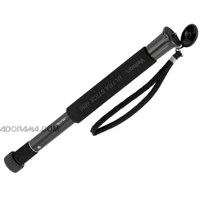
Velbon Ultra Stick M50 5-Section Twist Lock Monopod with Neoprene Grip and Strap, Height: 12.8 to 51.5 inch
find-price-button Velbon Ultra Stick Monopod via Adorama

This thing lives in my bag now, and it will be the first thing I grab for quick stabilization or when I want to travel extra light. I think i'll grab one of those Monopod belt pouches which should add more functionality..


monopod-belt-pouch
find-price-buttonMonopod Belt Pouch

33 Comments

Screen shot 2011-04-09 at 2.56.15 AM

Most DSLR video guys would never notice this problem, but for photographers, it's something that happens pretty often. If you've been doing long exposures or dark images and have been seeing some stray / hot / or dead pixels, here's a tip to try before sending the camera in. This has been implemented in DSLR cameras for a very very long time and is a way to remap these pixels (hide the bad ones). Is this some type of hack job? Actually, no. Many cameras will do this automatically on start up or shut down, and it's almost impossible for any chip with millions of pixels to be 100% perfect. Here's how you do it.

First remove any lens on the camera and place the body cap. You can actually do this with a lens, but you're more prone to 'light leaks'. Place the DSLR Body cap on and for safe measure, you might want to cover it again with a dark cloth, tshirt, or dark blanket. You basically want to keep any light from leaking into the camera while performing the cleaning.

Go to the Menu > Select Sensor Cleaning > Manual Clean.

2011-04-09 02.27.28

2011-04-09 02.27.42

The Mirror flips open, the camera basically should expect every pixel to be completely black, but if it's finding some white or red ones, it should remap them. After about 30 seconds, turn the power off on the camera. Now go out and test out your long exposures or dark imaging to see if those same hot pixels still show up.

Here's another tip. If you plan on buying or selling a DSLR, you can also perform a test against your sensor to see these stray or hot pixels. You can leave a lens on the camera, but just cover it up completely to prevent light leaks or sit in a very very dark room. Set the lens to 'Manual Focus', set ISO to the lowest like 100, shutter speed to say 1/60th, and aperture doesn't really matter. We're not doing long exposure here, because we don't want to confuse a Dead pixel with ISO noise. Next, take a picture. The picture should come out 'mostly' black, but this test will show some stray red or white hot pixels (unless it's already been remapped which is OK). If you're shopping for that camera, and you can't seem to get rid of those stray pixels, consider if they are so bad they would render your work useless. Again, since HD video doesn't actually use all the pixels by the time it's resized down, Video shooters may not notice something like this as easily.

4 Comments

Amazon Cloud Drive

Amazon's making it easier to store files online, which of course can be accessed from any Internet connected computer. This isn't anything new with companies like Microsoft's SkyDrive and Google Docs, but unlike Skydrive the max file size for individual files are 2GB and the UI looks much better than Google's Docs. Amazon is best known as a retailer, but what most people don't know is they are of the most reliable networks solutions online.

Secure and fast, it's all based on Amazon's S3 platform which was a huge game changer for online Photo Businesses that needed scalable and reliable storage solutions. If i'm not mistaken, it's also the backbone for Vimeo's video storage. S3 normally took a bit of coding or use of some third party uploader, but now Amazon's making storage more consumer friendly. Additional online storage can be purchased if needed, but one thing it's lacking is the ability to share out your stored files. Not a deal breaker, especially since you get 5GB free with just your basic login. Good for photos and for videos that need to be accessed from any internet connected computer. Check it out here: Amazon Cloud Drive File Storage

1 Comment

barcode-canon

Next time you see these barcodes, you can scan it with your mobile device to get instant access to information, websites, videos, and more with Microsoft Tags. Microsoft Tags are a new kind of colorful bar code that can be 'scanned' from your smartphone, giving you near instant access to web pages with detailed information about the product to help you make a purchase decision, including Ratings & Reviews from others who already own it. Once you install the free application, you simply launch the app on your smartphone, point your phone at the Tag, line it up in the crosshairs - and depending on your phone - either wait for it to scan the Tag or snap it yourself as if you were taking a picture.

Canon-bar-code

All the information you'll need to get started can be found here: https://www.usa.canon.com/cusa/consumer/standard_display/microsoft_tag?WT.mc_id=EM1104CG01007&RID=1-184AEK&CON=1-2B31-780&PRO=&CID=1-14P1Y1

14 Comments

When I posted this article, the world pretty much wiped out the inventory. http://cheesycam.com/quick-release-adapter-it-is-compatible-with-manfrotto/

Just FYI, if you haven't been able to get your hands on a Manfrotto Compatible Quick Release adapter, they are back in stock. They are perfect if you have the need to quickly move your camera from a Manfrotto tripod, over to another rig like a Slider, or Crane.


calumet-quick-release-adapter
find-price-button Quick Release Adapter + Plate (not Manfrotto branded)

If you're just in need of the plate itself, they have that available too (again not stating Manfrotto Compatible)
calumet-sliding-plate
find-price-button Sliding Plate (not Manfrotto branded)

9 Comments

Vimeo's got a sweet little application for the iPhone and iPod Touch. Future versions will include the iPad and Android based systems. Check out the video above for a peek at the features, or download it free.

Description
It’s finally here: the OFFICIAL Vimeo iPhone app!

We’ve packed all the best parts of Vimeo into one app! Now you can upload, edit, manage and watch your videos right from your iPhone. Need some inspiration? Watch great videos based on your personal preferences or our curated channels.

Vimeo is the best way to get your videos online in the highest quality with great tools to share publicly or privately. There’s many reasons millions use Vimeo and Time Magazine voted us a Top 50 Website for the last two years running.

Screen shot 2011-03-30 at 1.14.10 AM

Apple iTunes Vimeo LLC iPhone / iPod App

While you're there over on iTunes, check out the LightMeter Application for under a buck. Looks interesting.

Description
A light meter that is always in your pocket. It is indispensable for film photography with all manual camera. Measures reflected light, and allows reciprocity calculations.

Pocket Light Meter

Apple iTunes Pocket Light Meter

19 Comments

myx-television-music-channel

If you're wondering how accepted DSLR's are for Broadcast Television, here's something interesting to share about another network converting over. Myx TV's recently aired show 'Myx-Rated' is shot almost completely on Canon DSLR's using ONLY Canon Lenses. Olivia Speranza is one of the show's host along with Bay Area comedian Joey Guila. The station has actually been using DSLR's for several years on many of their shows, but have now almost completely moved from the bigger cameras like the Sony EX1. There are a few T2i's and 60D's, but mainly shot on Canon 7D and Canon 5D Mark II's. They're even using them outside of the studio environment, which is more typically shot on ENG style cameras like the EX1. I'm hearing that more than 95% of the footage on the Myx-Rated show is being shot on Canon DSLR's and other shows will follow.

Television-Myx_Rated
UFC Fighter Mark Munoz

Myx-Rated-BTS
Canon DSLRs w/ DJ QBERT

Episode 1 via YouTube

About the Show: Primetime pops with MYX TV’s newly launched show, MYX-Rated! MYX-Rated is your one source for everything Asian and everything awesome from trendsetters to the hottest undiscovered talent. Catch the show on Thursdays, 10PM eastern and 7PM pacific.

Some of the content in the Episode (above) might not make sense, don't worry - it's directed to an Asian audience. Though many of you might not be familiar with this Television station, over seas they are one of the largest asian networks under ABS-CBN International. Myx TV is their small channel broadcasted here in the U.S. In the Episode 1 video, you can see all the DSLR's being used. It's interesting to see some of the workflow Pros and Cons to switching to just DSLRs, so I'm trying to schedule an interview with the Producer, Camera Operators, and Editors to go over some basic 'DSLR related' workflow questions. For now I've had the opportunity to see a bit of the behind the scenes in their Redwood City, CA studio and they often accept members of the public to come in during their live taping 'recordings'. If you're interested in sitting in during one of their shows, leave a comment and i'll inquire about a formal way of going about it.

4 Comments

iPad Tilt ShiftiPad Tilt Shift

TiltShift Generator for iPad makes for interesting photos. Several different image editing options and blur control make this one cool little application, not to mention several thousands of dollars cheaper than a Lens.

Features (from iTunes)
- The original iPhone version was ranked second in the Photo Manipulation app category of the Best App Ever Awards. Judges included expert journalists from Wired, IGN, ArsTechnica and many more - these guys know what they're talking about!

- Twitter and email sharing - show the world your creations.
- Comprehensive in-app tutorial.
- Support for a range of image resolutions.
- Radial and linear blur masks.
- Blur strength control.
- Saturation, contrast and brightness controls.
- Vignetting (corner shadowing).
- In-app developer contact - we listen to our customers.

Available Here:

tilt-shift-generator
visit-button TiltShift Generator for iPad - Fake DSLR

11 Comments

Sucks posting this article, especially since the unit is not available for the same price (right now). I posted something about this new light hitting the market a few days ago, and of course it sold out fast. It was the first time a BI-Color Adjustable LED light was available for the price. Hopefully they'll get them back on the market ASAP, because this light makes balancing fill light color so easy. Don't worry i'm on top of this so if I find out updates, i'll get it on this blog for ya'. If you want to check out the original post for these light you can find it HERE.

240-dimmable-color-led
Sony battery Compatible + Panasonic w Adapter

240-led-diffuser
Drop in Diffuser (Magenta not Shown)

Color-change-led
Color Temperature Adjustment Dial

dimmable-led
Brightness Dimmer

240-led-light
Battery Meter

For now, here's a few inexpensive other options for Bi-Color, Color Changing, Color Adjustable LED Video Lights (below).

stellar-240-led-video-light
find-price-button 240 LED Video light (same as what i've received - rebranded / marked up)

312 LED Video Light
find-price-button 312 LED Color Changing Dimmable Video Light

[Update Update] Now Back Available Here:
240-barndoor
find-price-button 240 Dimmable Color Changing LED Video Light with Barndoors

barndoor-240
find-price-button 240 Dimmable Color Changing LED Video Light without Barndoors