
Ben Edwards has put together a 'Rough' guide to DSLRs. If you're just starting out or are curious about shooting video with DSLRs, there's plenty of 'disadvantages'. Of course the many 'advantages' of shooting DSLR video outweigh, so it's been a growing trend. Tidbits of information over at the jump. [Thanks Ben]
Random

Fireworks Photography Tips


(images from ChicagoFreeInfo.com)
4th of July is tomorrow, and i'm sure many of you are planning on tackling some fireworks photography. There's a couple of ways to go about this, but in either case I suggest going with a tripod. One method is to try and capture what you see. Open up the Aperture, speed up the shutter, and boost the ISO. You'll get a few images, but this is not really the preferred method for cliche Fireworks photography.
The better method is to drag the shutter. Let's start with the some basic settings. If you're shooting with a DSLR or Point and Shoot that offers manual controls, go Full Manual. Throw that sucker on a solid Tripod, you'll need it. If you have a shutter remote, use it for even sharper images. Bring a good wide lens or at least a lens that can offer both wide and zoom. You don't need a fancy lens, since you'll set the aperture to at least F/8-F/11 to make sure things fall in focus and the image will look sharp. Next keep the ISO low so that you don't introduce too much noise. Final and most important piece is to try long exposures by setting your shutter to stay open for at least 2 seconds or maybe a bit longer. Think of Fireworks in the same manner as Light Painting. For light painting you'll keep your shutter open for at least a few seconds so that you can capture the path of light being traced into the sky.
Want to try something a bit more advanced? Leave your shutter open for 30 seconds (or use bulb mode for longer exposures). Leaving your shutter open will continue to bring in light, so to keep your image from being too overexposed, place a black piece of cloth or cardboard over the lens 'in between fireworks'. Very important to cover up the lens while there isn't anything happening in the sky. What will happen is you'll end up with a full image of various fireworks all captured in one. The image samples above are probably representative of that technique. If I get to a spot with a good view, i'll try my hand this year and post it. Let me know what you guys come up with.
Canon 5D Mark II & 7D Refurbished

Available again is a couple of refurbished Canon 5D Mark II & Canon 7D DSLRs over at the Canon direct store. There's also 60Ds and T2i cameras as well. Last time I ordered a refurbished 5D Mark II, Canon had a really nice discount going on. I received mine looking brand spanking new and it's heavily in rotation with the rest of the equipment. A refurbished camera is 'never' a camera that has been repaired.
These refurbished cameras might come back from stores with excess inventory or returned for other reason, but never because they had previous issues. These refurbished cameras are also run through the same testing to make sure everything is in 'as new' condition. The one I received had 0 shutter actuations, and no signs of use. Besides Camera bodies, there's also lenses and other sorts. Check out the stuff over at Canon's site: https://shop.usa.canon.com/webapp/wcs/stores/

In other news, Canon has discounted some Exclusive colored T3 bodies in Red, Metallic Grey, and Brown. I think this is the first time Canon's offered such colors in any of their DSLRs. If you're not planning on doing any video, the T3 would be a good camera for just plain photography. You can find these exclusive colored bodies following the link: https://shop.usa.canon.com/webapp/wcs/stores/servlet/subCategory_10051_10051_-1_41771
USB Audio Monitoring Adapter – Magic Lantern
For you Magic Lantern junkies, here's a DIY video from Vimeo member Moritz Graeser on using the USB port to monitor audio from the camera. Of course if you're already using an external LCD monitor with a headphone jack, disregard. The instructions aren't super clear, but from a USB connector, you'll probably be using the middle two wires. Green cable being 'data -' and the white cable being 'data+'. The outer wires normally red and black are for Power.
On another note, shouldn't a basic Mini USB to 3.5mm Adapter for 0.99 cents + Free Shipping work too? Maybe i'm missing something though..

 Mini USB to 3.5mm HeadPhone Jack
DIY Bokeh Photography Effects
Without going much into detail, you can cut shapes that will show up in your Bokeh. Here's an excellent video from Make Magazine on how to do just that. This was a very popular DIY thing with still photographers, you can find tons of examples on Flickr. This technique also can be used with Video on DSLRs too. Best used with a shallow depth of field lens and more prominent with highly lit objects (lights).
Another fun DIY Bokeh video (below) from Vimeo member SuperNormals. Now go cut some paper and see what you can come up with. A good start is to turn off all your lights, pull out those old Christmas Tree lights and blur them away with your shapes..
If you're the lazy type, you can always start out with an already made Bokeh Kit, like the one found below. There's also some additional examples on that product page.

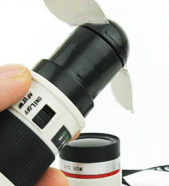
Novelty Canon Lens Electric Pocket Fan


This is just one of those cool things you have to have around your office or coffee table. A Canon Lens electric pocket fan to keep you cool this summer. This nifty little gadget should sit perfectly along side my Canon Lens Coffee Mugs.
Amazon Trade-In (Beta)

 Amazon Trade-In Program (Beta)
Amazon.com has opened up a beta program for Trade-In's
Latest iMac with ThunderBolt Interface


The latest in iMac's are announced, and probably the most exciting feature is the added ThunderBolt port. An interface said to be able to move data at an amazing 10Gbps -- double that of USB 3.0. It's been rumored that big name camera companies will be implementing this same interface into their cameras for fast offloading. There's plenty more great new features you probably already know about, but if not - you can find more following the link: NEW iMac 21"-27" QuadCore LED Backlit with ThunderBolt Inteface
Sanyo Eneloop XX – Rechargeable Batteries


I purchased the original set of Eneloops (white) from my local Costco about a year ago, and I have not had to buy AA, AAA, C Batteries, or D Batteries since. The set came with these very cool 'spacer' shells that transform simple AA batteries into C & D size batteries so you could use them on most portable electronics (not to mention all the kids toys and video game remotes).
 Sanyo Eneloop Spacer AA to D size
|
 Sanyo Eneloop Spacer AA to C Size
|
Sanyo has also released a higher capacity XX (Black and Grey) Eneloop battery rated at 2500mah, which holds a charge capacity of 75% up to one year in storage. This is not a replacement for the original version. The new XX battery should charge on the original Sanyo Eneloop charger, but if used with the optional 'boost' charger, a single battery can be brought to full charge in about 40 minutes. I honestly don't know anyone using the new XX version, and the (white) original ones I'm using seem to do perfectly fine.

Besides the Eneloops's slow drain abilities during storage, these batteries will power any of your devices up to 5x longer than just standard alkaline. Definitely worth it in the field, and will save you money over time. I've used them with the AA battery adapter on DSLR Battery Grips, LED Video Lights, Portable Audio recorders, Flash Triggers, Canon Speedlights, to Wireless Microphones. It's an investment up front to get started with Eneloops, but i've been rocking all of my batteries for more than a year in constant rotation on the charger, and these have to be the best rechargeable batteries i've ever owned.